StetPDF icon
Documents · Mac · Windows · Linux
StetPDF

PDFs, done properly.

Read, mark up, fill in, sign, redact and shrink PDFs on your computer. One price, no subscription, and your files never leave your machine.

Coming soon Tell me when it's out

£29 · one-off payment, free 1.x updates, use it on all your computers. Free to try.

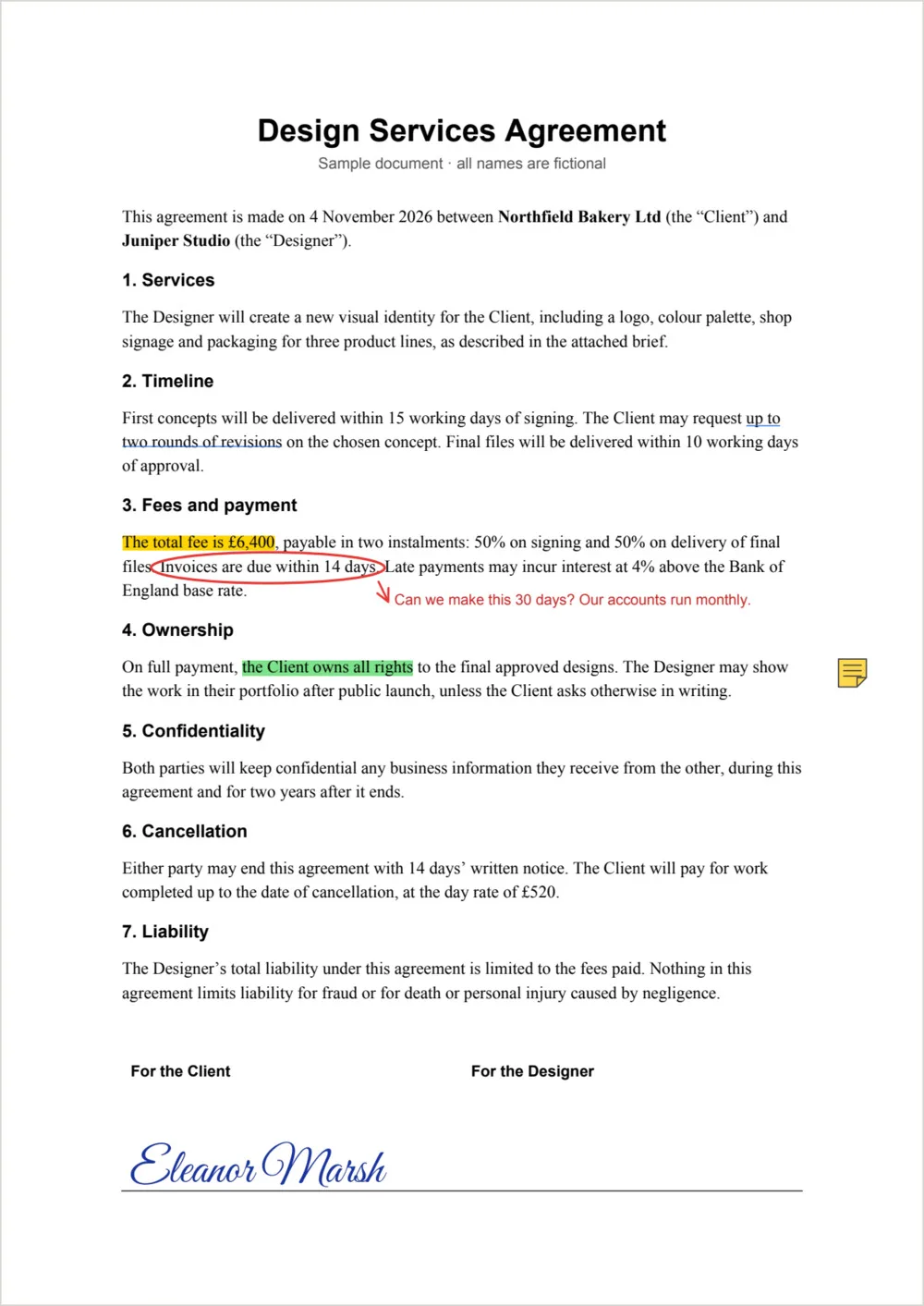
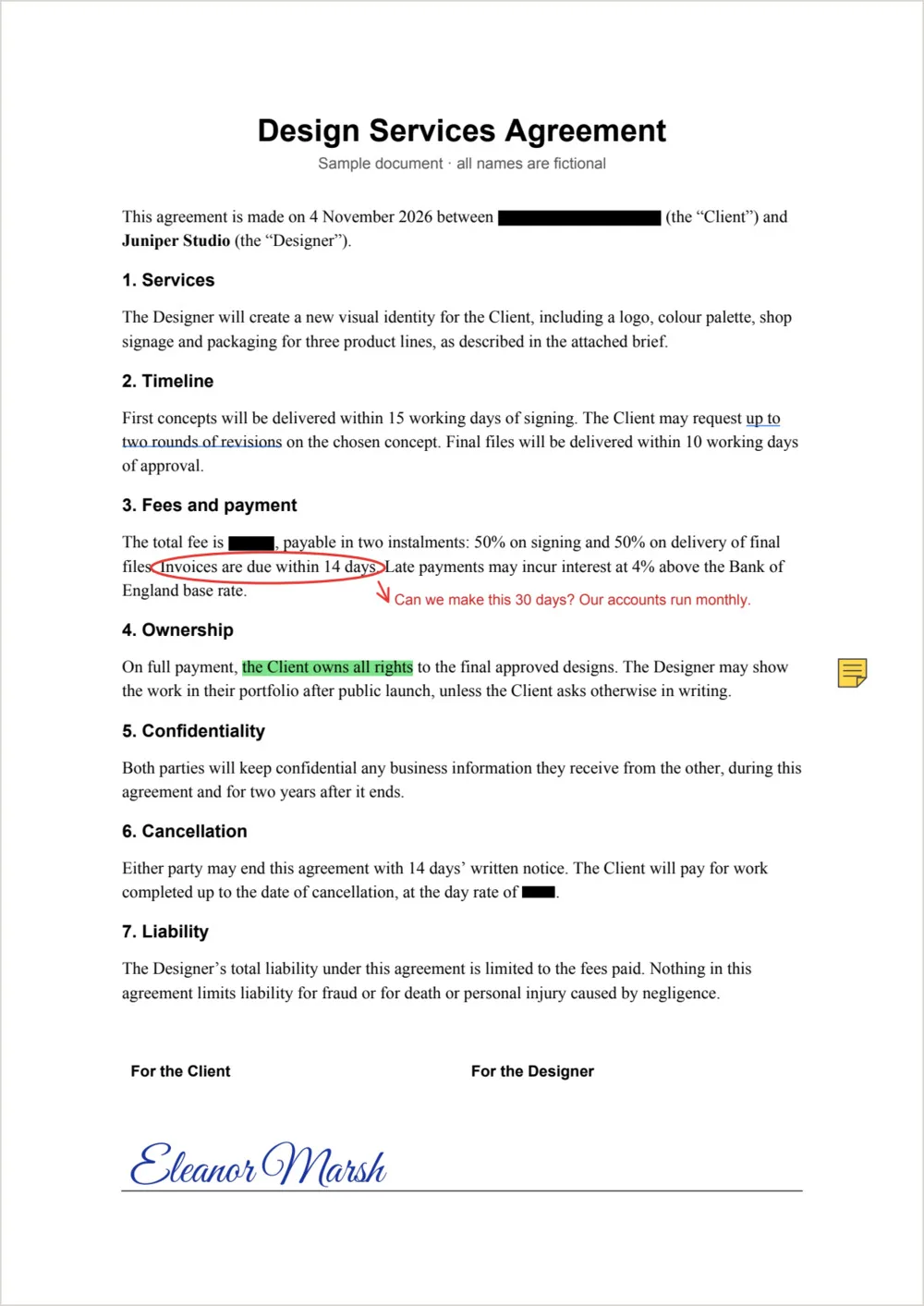
A design services agreement marked up in StetPDF, with highlighted terms, a circled payment clause and a comment, a sticky note and a typed signature The same agreement after redaction in StetPDF, with the fee, day rate and client name replaced by black boxes
How it works

Most PDF apps are either a free viewer that can't do much, or a subscription that does everything and wants your documents in its cloud. StetPDF is the one in between: a quick desktop app that does the real work on your own computer, for a single price.

What it does

Open a PDF and mark it up the way you would on paper: highlight what matters, circle a clause, leave a note in the margin. Fill in a form and sign it, by drawing or typing your name, or with a certificate signature that proves who signed and that nothing changed afterwards.

When something has to go, StetPDF removes it properly. Redaction takes the words, the image detail and the hidden text out of the file, not just out of sight. Then reorder or combine pages, and compress the result small enough to email.

Why "stet"?

Stet is the note an editor writes in the margin to say "let it stand". It's what StetPDF is for: make your marks, keep what matters, and send it on.

Mark it up

Highlight, underline and strike out text, draw, add shapes, arrows, text and sticky notes. They're standard PDF annotations, so they show up in Acrobat, Preview and Chrome.

Sign it

Draw, type or upload your signature, or sign with a digital ID (certificate) that Acrobat checks and shows as unchanged since signing.

Redact for real

Redaction removes the text, the parts of images and the hidden text layers underneath, not just a black box on top.

Fill in forms

Type into the form fields a PDF already has, tick the boxes, pick from the lists, and save.

Pages your way

Drag pages to reorder, rotate, delete, add pages from other PDFs, split out a few pages, or turn photos and scans into a PDF.

Make it smaller

Compress a PDF for email or upload. StetPDF shows the new size before you save, and keeps text sharp and searchable.

Find anything

Search the whole document, then highlight or redact every match in one go.

Small and private

About a 13 MB install that opens instantly. No account, no uploads, no tracking.

Getting the most from it

Good to know

  1. Sign last

    A certificate signature records exactly what you signed. Make your changes first, then sign; StetPDF saves the signed copy as a new file.

  2. White-out or redact?

    White-out only covers something up and the content is still in the file. Use Redact when it mustn't be found, copied or searched.

  3. Combine PDFs

    Drop PDFs onto the page list, or use Add PDF under the pages, to put them exactly where you want.

  4. In the terminal too

    Every feature is also a command, such as stetpdf merge, stetpdf redact and stetpdf compress, for batch jobs and scripts.

Questions

Asked and answered

Is it a subscription?

No. You pay once, £29, and get every 1.x update free. You can install it on all your own computers.

Can I try it first?

Yes. StetPDF is free to download and use for viewing, and every feature works. Until you register, files you save carry a small "Edited with StetPDF" line at the bottom of each page. Enter your licence key and it's gone from everything you save afterwards.

Do my files get uploaded anywhere?

No. StetPDF works entirely on your computer and doesn't need an internet connection. We never see your documents or your signatures.

Will Acrobat accept my digital signature?

Acrobat checks StetPDF's certificate signatures and shows whether the document has changed since signing. For Acrobat to also show your identity as verified, the certificate has to come from a certificate authority Adobe trusts. StetPDF can use one of those, or make you a personal certificate that others can choose to trust.

Is redaction safe enough for legal and personal data?

StetPDF removes the underlying text and image content rather than drawing over it, including invisible OCR text. It saves a new copy and leaves your original untouched. Always check the result before you share it.

Which computers does it run on?

Mac, Windows and Linux. We'll list the exact supported versions when it goes on sale.

StetPDF is made by Partech Systems Limited.

Privacy policy · Support · More apps